

Everyone wants to talk about the launch. The Product Hunt post, the first paying customer, the MRR screenshot. What nobody wants to discuss is the twelve DNS records you had to configure before your transactional emails stopped landing in spam.
Or the custom 4xx and 5xx pages. Or the SSL certificate renewal that you almost forgot about until your monitoring pinged you at 2am.
This is the unsexy work.
The invisible infrastructure that separates a product people trust from a weekend project they close after three seconds.
The Invisible Checklist
Every product I've ever shipped has required the same tedious pre-launch work. It's never documented in the build-in-public threads. It rarely makes it into the "lessons learned" posts.
It's just there, waiting, a pile of tasks that feel like busywork until one of them breaks and takes your entire launch down with it.
I'm talking about things like SPF, DKIM, and DMARC records for email authentication. Many non-technical solo founders don't have the knowledge to set these up correctly, and they end up with transactional emails that never reach their users.
Your welcome email, your password reset, your purchase confirmation are all sitting in a spam folder because you didn't add a record to your DNS.
I'm also talking about favicons, OG images for social sharing, Apple touch icons, the web manifest file that makes your site installable, the robots.txt that tells search engines what to index, the sitemap.xml that helps them find everything, and the canonical URLs that prevent duplicate content penalties.
I'm talking about security headers like HSTS, Content Security Policy, and X-Frame-Options. The stuff that prevents your site from being embedded in malicious iframes or having its cookies stolen.
I'm talking about a custom 404 page that doesn't make your product look abandoned, and a 500 error page that at least tells users something went wrong instead of showing them a stack trace.
None of this is exciting, and all of it matters.
The Pre-Launch Reality
Here's the actual work that goes into launching a product that people will trust with their money:
| Category | What You Actually Need |
|---|---|
| SPF record, DKIM signature, DMARC policy, verified sending domain, working unsubscribe links | |
| SEO | Title tags, meta descriptions, OG images, Twitter cards, canonical URLs, structured data, robots.txt, sitemap.xml |
| Security | SSL certificate, security headers, no leaked API keys, no debug statements in production |
| Assets | Favicon, apple-touch-icon, web manifest, properly sized images |
| Legal | Privacy policy, terms of service, cookie consent banner, GDPR compliance |
| Basics | Custom 404 page, custom 500 page, working health endpoint, proper redirects |
| Code Quality | Passing test suite, clean linter output, no TypeScript errors, dependency audit |
This list represents the bare minimum, it's far from comprehensive. Every single item on it is something I've personally forgotten at least once, usually at the worst possible time.
I've also had 20 years to make those mistakes too. Years ago we did not have AI to help us figure this shit out.
I once launched a site with debug mode still enabled. I've shipped with an expired SSL certificate. I've deployed without setting up error tracking and then had no idea why users were complaining about a blank screen. I've missed linter warnings that turned out to be actual bugs in production.
Every one of these mistakes was preventable. I just didn't have a system for catching them.
The Code Nobody Sees
Beyond the infrastructure work, there's another layer of unsexy effort that happens entirely in your codebase.
Writing tests is not glamorous. Nobody's going to applaud your 85% code coverage or your well-structured integration suite. But when you're refactoring a payment flow at midnight and the tests catch a regression before you push to production, you'll be grateful you wrote them.
Tests exist to make sure your code still works six months from now when you've forgotten how half of it functions.
Linting your code feels like busywork until it catches the undefined variable that would have crashed your app. Setting up TypeScript feels like overkill until it prevents you from shipping a typo that breaks your entire checkout flow.
Running npm audit or bundle audit feels paranoid until you discover you've been shipping a dependency with a known security vulnerability for three months 😱
These practices don't make for interesting content.
You can't screenshot a passing CI pipeline and expect engagement. But the alternative is shipping code that you're not confident in, and that uncertainty accumulates over time as every shortcut you take in code quality becomes technical debt that slows you down later.
The unsexy truth is that professional software requires professional practices, even when you're a solo founder building in your spare time.
Why I Built Preflight
I got tired of manually checking whether I'd remembered to add the favicon. Tired of wondering if my OG images were the right dimensions. Tired of discovering three weeks after launch that my emails were landing in spam because I'd misconfigured my DMARC record.
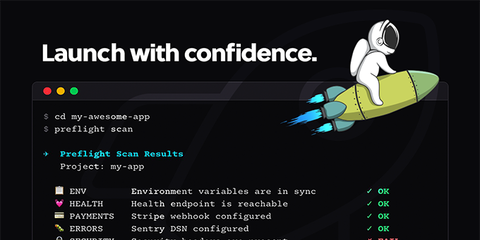
Preflight is a command-line tool that scans your codebase and tells you if you're ready to ship.
It checks for all the unsexy stuff, including environment variable parity between development and production, SSL certificate validity, security headers, leaked secrets, SEO metadata, email authentication, cookie consent banners, and custom error pages.
It also runs against 70+ services and integrations like Stripe webhooks, Sentry error tracking, analytics configuration, and payment provider setup.
It's the pre-flight checklist you run before takeoff, except instead of checking fuel levels and control surfaces, you're checking whether your Content-Security-Policy header is configured correctly.
You run preflight scan and it tells you what's broken. There's no dashboard to maintain, no account to create, and no configuration files to manage. Just a command that tells you whether you're going to embarrass yourself in production.
I built it because I needed it. The fact that other people might find it useful is a bonus.
Nobody Celebrates Maintenance
Shipping is barely the beginning. After you launch, the real work starts.
You're fixing bugs that don't get tweets and pushing dependency updates that nobody notices. Security patches have to go out immediately, performance improvements shave 200ms off page loads, and edge cases only surface when you have real users with real data doing things you never anticipated.
And through all of it, you're supposed to keep your users informed about what's changing. Changelogs are for humans, not machines, and they need to be readable, understandable, and up to date.
This is another piece of unsexy work that most indie makers neglect entirely.
Your product is evolving constantly, but your users have no idea because you never tell them. They experience bugs that you've already fixed. They miss features you've already shipped. They churn because they think you've abandoned the product when in reality you've been pushing commits every day.
Good changelogs build trust.
They show users that you're actively working on the product, that you're listening to feedback, that things are getting better. They reduce support tickets because users can find answers themselves. They turn one-time buyers into long-term customers because people want to invest in products that are clearly going somewhere.
The problem is that maintaining a changelog is tedious. You finish a feature, you merge the PR, and the last thing you want to do is write a user-facing description of what you just built. So the changelog gets neglected, updates pile up, and users stay in the dark.
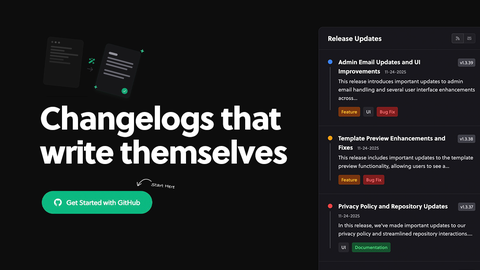
This is why AutoChangelog exists. It reads your pull requests and generates changelog entries automatically. You still review and edit them, but the first draft is done for you. The barrier to keeping users informed drops from "I'll do it later" to "it's already done."
I built it because I was bad at keeping changelogs. I suspect most makers are.
The Trust Equation
What I've learned after building products for over twenty years is that trust is not built through a single signal but through a system of reinforcements.
When someone lands on your product for the first time, they're making snap judgments about whether you're legitimate. They're looking for cues.
Does this look professional? Does the site load fast? Are there obvious bugs? Is the copy riddled with typos? Does the checkout feel secure?
The unsexy parts are where you signal that you give a damn.
A custom 404 page shows you thought about edge cases. Proper security headers show you care about their data. Working email deliverability shows you understand how the internet actually works. A maintained changelog shows you're still here, still building, still improving.
Clean code with passing tests shows you take your craft seriously, even if users never see it directly.
These details accumulate into an overall impression of quality. You can have the most innovative product in your category, and people will still bounce if your site feels sketchy.
They'll close the tab if they get a certificate warning. They'll unsubscribe if your emails keep landing in spam.
The products that last are built on foundations nobody sees.
Checklist Culture
There's a reason pilots use checklists before every flight. The consequences of forgetting something are too high, and human memory is unreliable.
It doesn't matter how experienced you are or how many times you've done it before. The checklist catches the dumb mistakes that your brain convinced you couldn't happen.
Product launch checklists exist for the same reason. You know what needs to be done, but there's too much to remember when you're also trying to finish features, write copy, set up payment processing, and figure out your go-to-market strategy.
The unsexy work gets dropped first because it feels optional. It's not the core product and it's not the feature that's going to make or break your launch. It feels like infrastructure, background noise, something you'll get to later.
Later never comes. Later is when you're debugging why half your users never got the confirmation email.
| What You Think Will Break Your Launch | What Actually Breaks Your Launch |
|---|---|
| Not enough features | Emails landing in spam |
| Design isn't polished enough | Missing OG images so social shares look broken |
| Price is wrong | SSL certificate expired on launch day |
| Competition is too strong | No error tracking, so you don't know users are seeing blank pages |
| Nobody will care | Debug mode left on, exposing stack traces to everyone |
| Code isn't clean enough | Skipped tests, shipped a regression that breaks checkout |
The unglamorous stuff is where the actual risks live.
Shipping Scared, Shipping Ready
I wrote recently about shipping scared. The fear of launching doesn't go away with experience. You just learn to ship anyway.
What I didn't say in that piece is that shipping scared doesn't mean shipping unprepared. Fear centers on judgment, criticism, and failure. The unsexy work minimizes unforced errors, and addressing one doesn't require ignoring the other.
You can be terrified of how people will receive your product and still make sure your DNS is configured correctly. You can be anxious about the criticism and still check that your error pages work. You can run your test suite one more time before you deploy, even if your hands are shaking.
The unsexy parts aren't obstacles to launching. They're what makes launching possible without immediately regretting it.
The Glamorous Stuff Is The Tip
Every product you admire started with someone configuring DNS records. Every successful SaaS has a privacy policy that someone had to write. Every trustworthy checkout flow has security headers that someone had to research and implement.
Every reliable codebase has tests that someone (or a robot...) took the time to write.
You don't see this work because it's not interesting. It doesn't make for good Twitter content. Nobody's going to retweet your DMARC record or your 94% test coverage. The indie hacker community celebrates shipping fast, which is fine, but the products that stick around are the ones where someone took the time to get the boring stuff right.
You don't need to spend months perfecting every detail before you launch. The unsexy work is simply part of the job, and skipping it catches up with you.
The glamorous stuff is the tip of the iceberg. The stuff nobody sees is what keeps the whole thing afloat.